How Digital Care Management Systems Support CQC Inspection Readiness
As the Care Quality Commission (CQC) continues to evolve its assessment approach, inspection readiness is becoming less about preparing for a single inspection and more about demonstrating safe, effective and person-centred care every day.
For homecare providers, that means having systems in place that not only support care delivery but also make it easy to capture, organise and retrieve evidence when it’s needed.
In this article, we’ll explore:
- Why Digital Systems Matter for Inspection Readiness
- How Everyday Care Creates Inspection Evidence
- 10 Digital Features That Support CQC Inspection Readiness
- Why Continuous Readiness Beats Last-Minute Preparation
- Frequently Asked Questions
Why Digital Systems Matter for Inspection Readiness
The CQC expects providers to demonstrate how they deliver safe, effective, caring, responsive and well-led services. While policies and procedures remain important, inspectors are increasingly looking for evidence generated through everyday care delivery.
Care plans, progress notes, medication records, risk assessments, staff training records, incident reports and feedback all help build a picture of how a service is performing.
The challenge isn’t creating evidence,it’s ensuring that evidence is organised, accessible and easy to demonstrate during an assessment.
A modern digital care management system helps bring this information together in one place, supporting stronger governance, operational oversight and continuous inspection readiness.
How Everyday Care Creates Inspection Evidence
Every interaction with a service user creates valuable evidence.
Updating a care plan, recording a visit, documenting a safeguarding concern, completing a risk assessment or reviewing staff competencies all contribute to the evidence inspectors may review.
Rather than collecting documents immediately before an inspection, providers can build an evidence library as part of day-to-day care delivery. This not only reduces administrative burden but also provides greater confidence that information is accurate, current and readily available.
10 Digital Features That Support CQC Inspection Readiness
When reviewing your current care management system, consider whether it includes the following capabilities:
1. Mobile Point-of-Care Documentation
Enable staff to record care in real time, improving the accuracy and timeliness of records.
2. Centralised Document Management
Store care records, policies, procedures, audits and supporting documentation securely in one location.
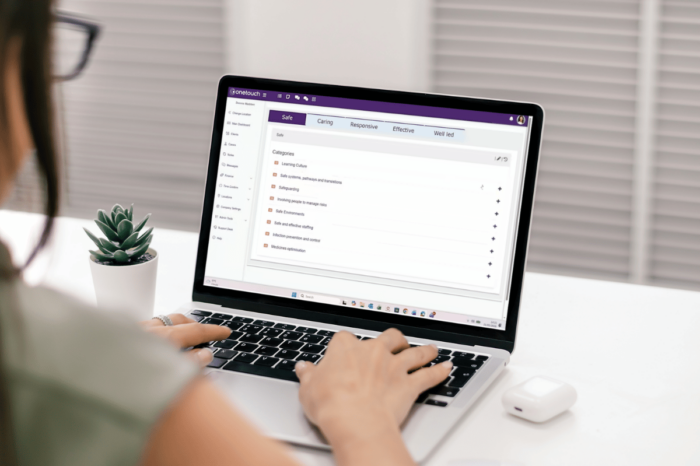
3. CQC Audit Functionality
Organise evidence against the CQC’s five key questions (Safe, Effective, Caring, Responsive and Well-led), helping build a central evidence repository that supports inspections and internal audits.
4. Audit Trails
Maintain a transparent record of care delivery, decisions and communications through time-stamped activity logs.
5. Real-Time Dashboards
Provide managers with visibility of quality indicators, incidents, workforce compliance and operational performance.
6. Incident, Safeguarding and Risk Management
Record, monitor and report incidents, safeguarding concerns and risks from a single platform.
7. Tagging and Evidence Retrieval
Use tags and categorisation to make records easier to search, retrieve and report on during inspections.
8. Staff Training and Competency Records
Maintain mandatory training, competencies and compliance records in one place.
9. Reporting and Analytics
Generate reports quickly to demonstrate performance trends, governance activities and quality improvement initiatives.
10. Integrated Care Management
Bring together care delivery, workforce management, scheduling, finance and reporting within a single platform, reducing duplication and improving operational visibility.
Assess Your Current Care Management System
Not sure whether your current care management system includes the digital capabilities needed to support CQC inspection readiness?
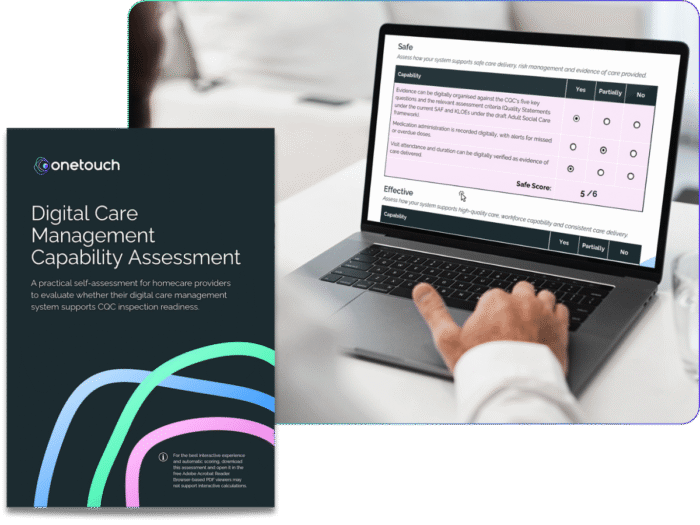
Download our interactive Digital Care Management Capability Assessment to evaluate your platform against essential capabilities, including evidence management, audit functionality, reporting, governance and inspection readiness.
→ Download the free assessment
Why Continuous Readiness Beats Last-Minute Preparation
Inspection readiness shouldn’t begin when the CQC announces a visit.
Providers that embed good governance, quality monitoring and evidence management into everyday practice are generally better positioned to demonstrate compliance and respond confidently to inspections.
Digital care management systems support this approach by helping organisations maintain accurate records, monitor performance, identify emerging risks and retrieve evidence quickly when required.
Ultimately, technology doesn’t replace good care,but it can make it significantly easier to demonstrate it.
Frequently Asked Questions
What does the CQC expect from a digital care management system?
The CQC does not prescribe specific software. However, providers should be able to demonstrate that their systems support safe, effective, person-centred care and enable evidence to be accessed efficiently during assessments.
Do digital systems improve CQC ratings?
Technology alone won’t improve a rating. Good leadership, governance and quality care remain the key drivers. However, digital systems can make it easier to capture evidence, monitor performance and demonstrate compliance.
What features should a care management system include?
Look for capabilities such as mobile care recording, audit trails, reporting dashboards, incident and risk management, staff training records, document management, evidence tagging and CQC audit functionality.
How can digital systems reduce inspection preparation time?
By capturing information as part of everyday care delivery, providers can build an evidence library continuously rather than gathering documentation immediately before an inspection.
How does OneTouch support inspection readiness?
OneTouch brings care delivery, workforce management, governance and reporting together within a single platform. Features such as real-time dashboards, audit trails, evidence tagging and dedicated CQC audit functionality help providers organise evidence, monitor performance and maintain continuous inspection readiness.
Did You Know?
A care management system should do more than record care, it should help you demonstrate it.
OneTouch includes a range of features designed to support continuous CQC inspection readiness, including:
- CQC Audit functionality to organise evidence against the five key questions (Safe, Effective, Caring, Responsive and Well-Led).
- Real-time dashboards providing visibility across quality, compliance and operational performance.
- Tagging and categorisation to make records and supporting evidence easy to search and retrieve.
- Audit trails and reporting to demonstrate governance, accountability and continuous improvement.
- Mobile point-of-care documentation to ensure records are accurate, up to date and readily available.
Together, these features help providers build an evidence library as part of everyday care delivery, making inspection preparation faster, simpler and less reliant on last-minute administration.
Want to see it in action?
Book a personalised demonstration to discover how OneTouch can help your organisation strengthen governance, simplify evidence management and maintain continuous inspection readiness.